 MealSaid
Best free calorie tracker for iPhone: widgets, Siri, Watch
MyNetDiary's free tier documents 4 home screen widgets, 12 lock screen widgets and a Watch app that logs food. Five iPhone trackers, checked 25 Oct 2026.
On this page
If you want the most iPhone for nothing, install MyNetDiary. Its own iPhone page claims a native Apple Watch app that logs food, 4 home screen widgets and 12 lock screen widgets, all on a free tier with no ads and no account needed.
Cronometer is the runner up with 5 home screen widgets and a Watch app that adds food, but its Siri route is locked behind Gold at $59.99 a year.
I checked what each company documents on 25 October 2026, not what the App Store screenshots suggest. I build one of these apps, so the second to last section is the one to discount.
Which free tracker does the most on an iPhone?
MyNetDiary, by a wide margin on documented iPhone features.
Its free tier page lists the barcode scanner, voice input, 108 nutrients, Apple Health sync, the Apple Watch app and Siri, describing the core version as "free and ad-free" (MyNetDiary, updated 15 October 2026).
The Watch app is the part other apps do not match. MyNetDiary says it logs foods, meals, water and quick calories from the wrist and can show any tracked nutrient (MyNetDiary).
That iPhone page is MyNetDiary selling MyNetDiary, so read its counts as the company's claim. Everything on the other four rows below comes from a help article instead.
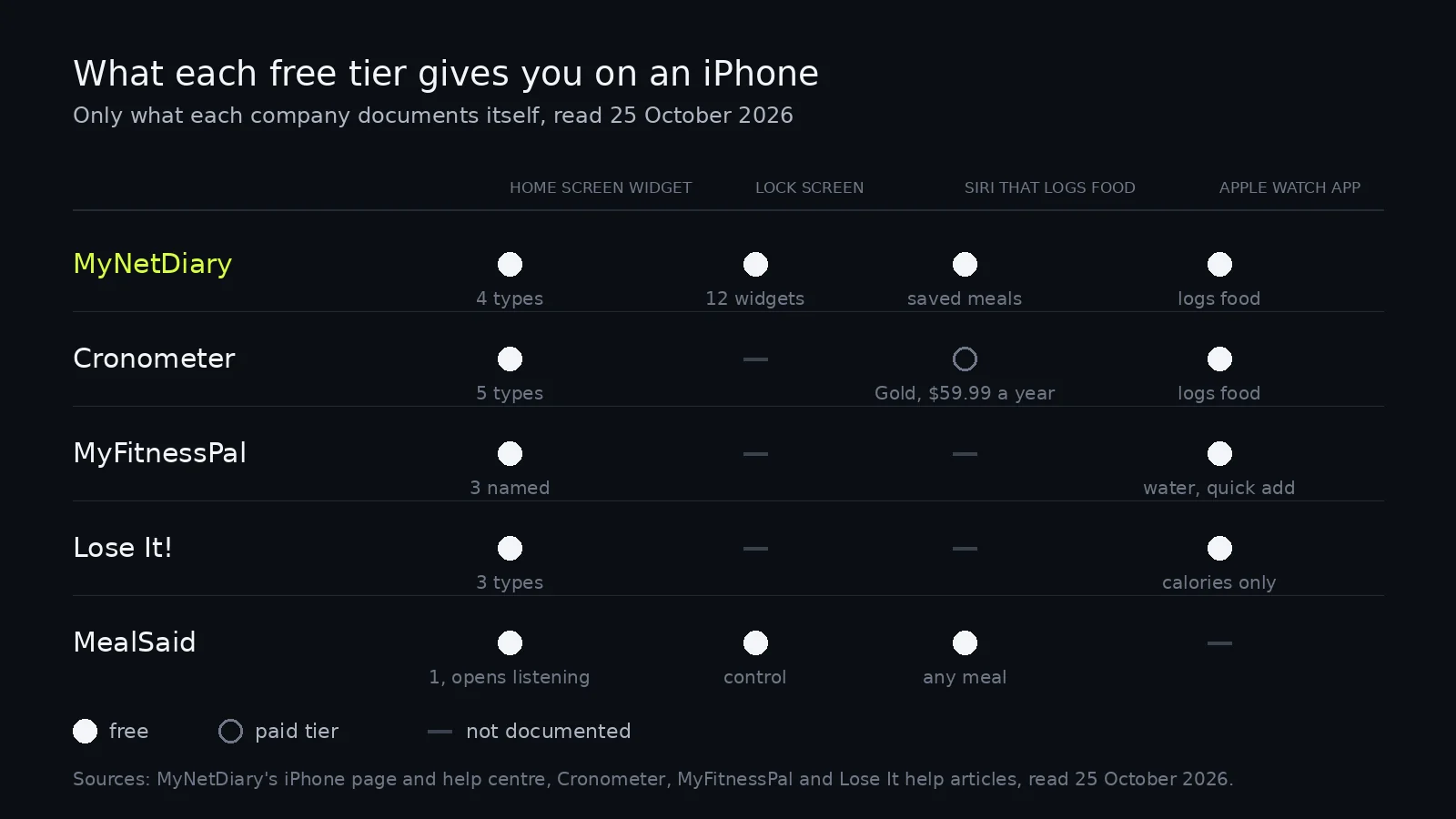
| App | Widgets named for iPhone | Siri that logs food | Apple Watch app | Widget source |
|---|---|---|---|---|
| MyNetDiary | 4 home screen, 12 lock screen | Saved My Meals, free | Logs foods, meals, water | MyNetDiary |
| Cronometer | 5 home screen | Gold only, $59.99 a year | Add Food from recent items | Cronometer |
| MyFitnessPal | 3 named, water one is interactive | None documented | Water and quick add calories | MyFitnessPal |
| Lose It! | 3, including Log Foods | None documented | Calorie bonus only, free | Lose It! |
| MealSaid | 1 widget, 1 Lock Screen control | Any meal, free | Nothing I have published | How it works |
Each Siri and Watch claim in that table is linked in the section that covers it.
MacroFactor is missing on purpose. Its App Store listing says it "does not offer a free subscription tier" and describes a seven day trial, so nothing it does on an iPhone is free (App Store).
How many widgets does each app actually have?
Sixteen for MyNetDiary, five for Cronometer, three each for Lose It and MyFitnessPal.
Cronometer names Energy Consumed, Energy Remaining, Fasting, Water Tracking and Streaks. The water widget adds and removes glasses from the home screen, and the Energy Remaining widget carries an add food button (Cronometer, updated 22 October 2026).
Lose It names three iOS widgets: Goal Ring Calorie Countdown, Macros Breakdown and Log Foods (Lose It!, updated 6 July 2026).
MyFitnessPal's widget page names Today's Calories and Today's Macros, then adds an Interactive Water Widget for iOS 18 or later, which is the only one of its widgets that writes anything (MyFitnessPal, updated 27 August 2026).
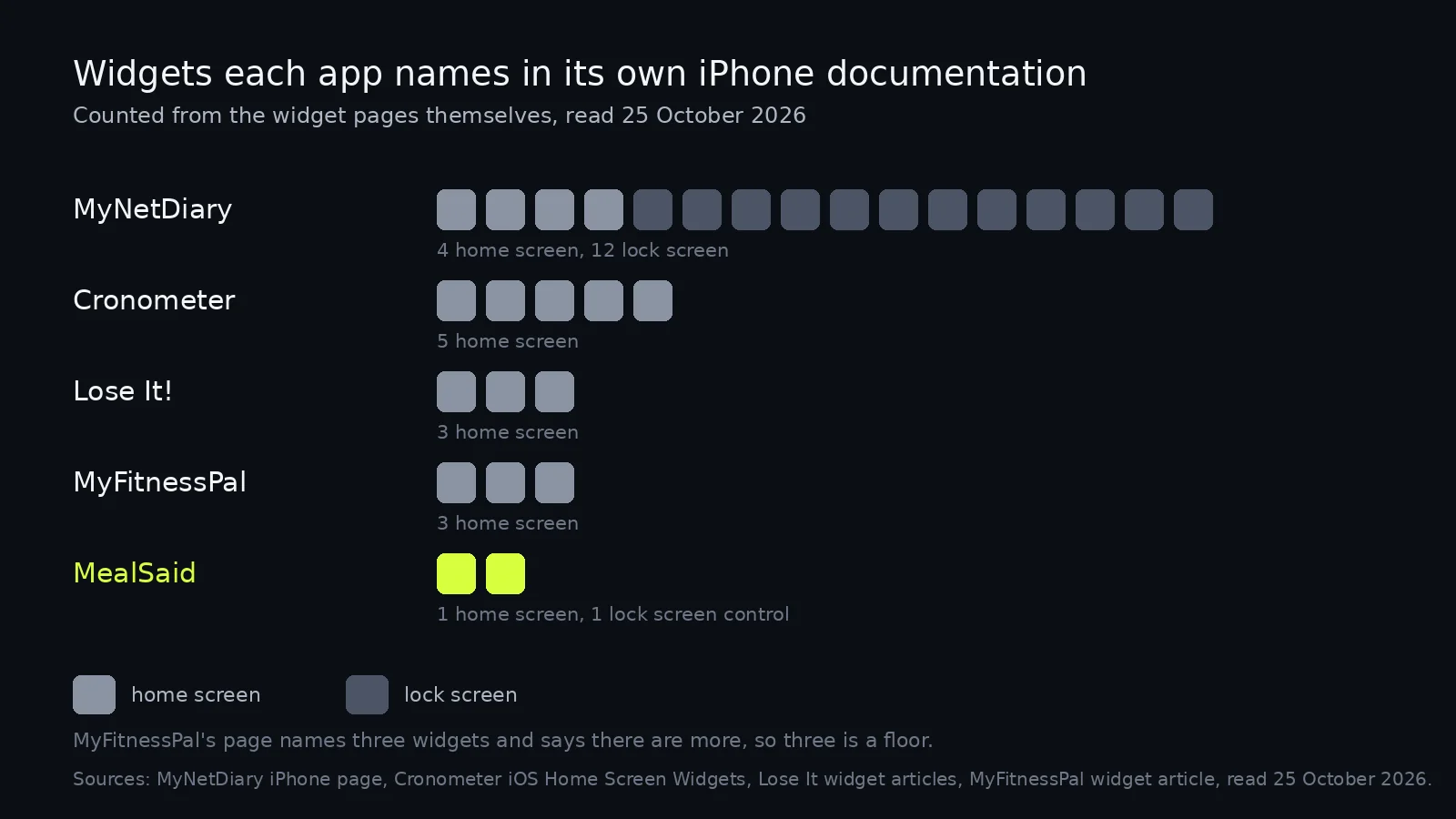
Two of those counts are floors. MyFitnessPal's page says there are "a few options to choose from such as" the two it names, and I counted what was named.
Can you log a meal with Siri for free?
Only a meal you already saved. Of the five apps here, open ended Siri logging is paid everywhere except MealSaid.
MyNetDiary's Siri page describes built in shortcuts for calorie checks, the daily deficit, water logging and My Meals logging, added from Add to Siri buttons on the matching screens (MyNetDiary). Say the phrase and a saved meal goes in; a sandwich you invented at lunch does not.
Cronometer does take any food by voice, and it is a Gold feature at $59.99 a year. The setup list runs to eleven sub-steps across three stages before the first log (Cronometer, updated 24 October 2026).
I could find no Siri phrase that logs food in MyFitnessPal or Lose It. Both put voice behind a button inside the app, which is the whole point of the post on logging without opening the app.
Does anything reach the Lock Screen?
MyNetDiary, with 12 lock screen widgets by its own count.
Cronometer, MyFitnessPal and Lose It all document home screen widgets only, and searching all three help centres for lock screen articles returned nothing about widgets or controls.
MealSaid has a Lock Screen control, which is a different iOS thing: a button in the control picker that opens the app already listening, rather than a widget that displays numbers.
Is the free Apple Watch app worth anything?
It depends what you call logging. Two of the four will take a food, two will take a number.
Cronometer's Watch app shows the Energy Summary and has an Add Food widget that lists your most recent items (Cronometer, updated 19 October 2026).
MyFitnessPal's Watch app lets you add water or quick add calories, and feeds step data back to your goal (MyFitnessPal, updated 27 August 2026). Lose It does not take food on the wrist at all: its Watch support is a free calorie bonus from resting and active calories, and no food entry is described (Lose It!, updated 9 September 2026).
That read figure matters more than it looks. An app that reads nutrition back can pick up meals you logged elsewhere, which is the test in our Apple Health comparison.
Which would I put on my own iPhone?
MyNetDiary first, then mine for the meals I would otherwise skip.
MealSaid is one surface done one way. You say the whole meal, it writes calories, protein, carbs, fat and fiber to Apple Health, and at times you pick your phone rings and a voice asks what you ate.
Against the table above it is thin. No barcode scanner, no food database, no Apple Watch app I can point you to, no nutrients beyond those five, iPhone only on iOS 26, English only.
MyNetDiary beats it on everything a feature list can measure, free, and anyone comparing what each free tier keeps should start there. The narrower pitch is for people who have installed three of these and logged in none of them.
How I checked this
Checked 25 October 2026. The widget, Watch and Siri claims come from each company's own help article or iPhone page, read on that date through the public help centre API where the site returns 403 to scripts. MyNetDiary's widget and Watch numbers come from its marketing page rather than a help article, so they are the company's claim, not a count I made from a phone.
I did not install five apps and photograph their widget pickers. A count of named widgets is a floor, since a company can ship one and not document it, and MyFitnessPal's page openly says there are more than the two home screen widgets it names.
MealSaid's row describes my own app. Its Siri phrase, Lock Screen control and widget are described in the earlier post, and the step counts behind the other apps' logging flows are in the Cronometer alternative post. Corrections to ohmbrock42@gmail.com.
Questions
What is the best free calorie tracker for iPhone?
MyNetDiary, on documented iPhone features. Its free tier covers the barcode scanner, 108 nutrients, a native Apple Watch app that logs food, home and lock screen widgets, and Apple Health sync, with no ads.
Which calorie app has an iPhone widget that logs food?
Lose It names a Log Foods widget, and Cronometer's Energy Remaining widget carries an add food button. MyFitnessPal's only interactive widget logs water.
Can I log a meal with Siri for free?
Only for meals you have already saved. MyNetDiary's built in shortcuts cover calorie checks, water and My Meals, while Cronometer's open ended Siri logging needs Gold at $59.99 a year.
Which free calorie app works on Apple Watch?
All four of the big ones install a Watch app, but they do different things. MyNetDiary logs foods, meals, water and quick calories from the wrist, while Lose It uses the watch only as a calorie source.
Does a free calorie app put anything on the iPhone Lock Screen?
MyNetDiary says it has 12 lock screen widgets. Cronometer, MyFitnessPal and Lose It document home screen widgets only, and MealSaid has a Lock Screen control that opens its listening screen.