 MealSaid
Hands-free calorie tracking while cooking or driving
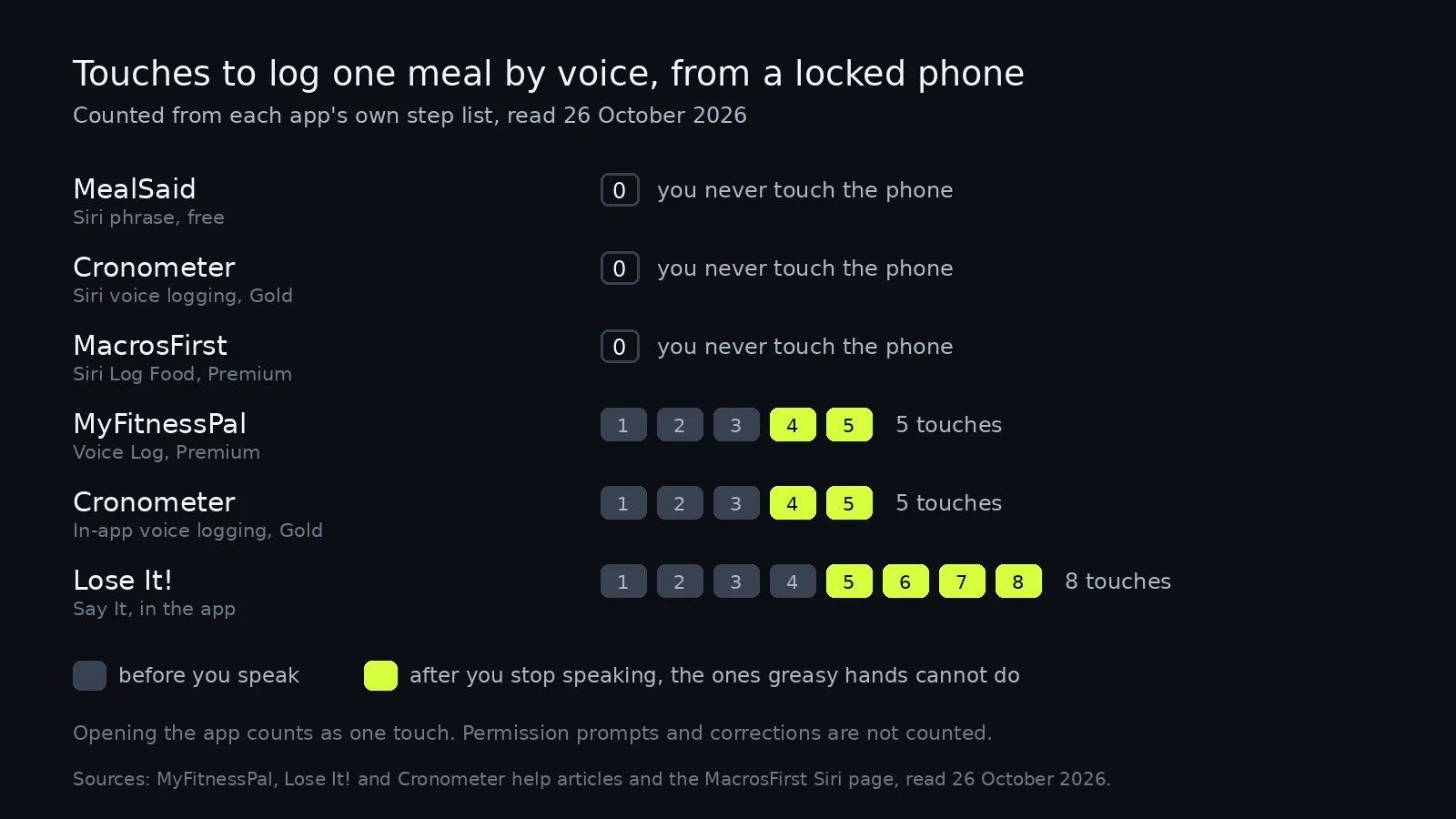
Three iPhone apps log a meal with zero touches. MyFitnessPal needs five and Lose It needs eight, counted from their own steps on 26 October 2026.
On this page
Three iPhone calorie apps log a meal without you touching the phone at all: Cronometer on Gold, MacrosFirst on Premium, and MealSaid, which I built and which is free. All three work through a Siri phrase, so the app never opens. Every other voice feature I checked makes you tap at least twice after you stop talking.
I counted the touches in each app's own step list on 26 October 2026. MyFitnessPal's Voice Log takes five touches from a locked phone to a saved entry, Cronometer's in-app voice logging takes five, and Lose It's Say It takes eight.
None of them work through the car screen, mine included. Apple's CarPlay category list has no slot for food logging.
What counts as hands-free?
Two moments decide it: whether you can start without touching the phone, and whether you can finish without touching it. Most voice features only solve the middle.
Turning speech into text is the easy part. Every app below does that well enough once you are already on its logging screen.
The cost sits at the two ends. You tap your way in, then you tap to confirm the match, and both taps want a dry finger and a look at the screen.
Which apps log a meal with zero touches?
Three, and all three use a Siri phrase instead of a button inside the app.
| App | Start without touching the phone | Finish without touching the phone | Documented to work when locked | What it costs |
|---|---|---|---|---|
| MealSaid | Yes, "log in MealSaid" plus the meal | Yes, Siri shows a card | Yes, in my step by step post | Free |
| Cronometer | Yes, "Log food in Cronometer" | Yes, Siri asks which foods, a banner confirms | Not stated | Gold |
| MacrosFirst | Yes, "Log food in MacrosFirst" | Yes, serving and meal handled in Siri | Not stated | Premium |
| MyFitnessPal | No, three touches before you speak | No, the arrow and then Log | No | Premium |
| Lose It! | No, four touches before you speak | No, four touches after | No | Not stated in the article |
| MacroFactor | No, Describe lives inside the app | No, you confirm the plate | No | Paid app |
Cronometer is the one to look at if you want this on a mature tracker. Its article says Gold iOS users can log "without having to open the app", and that a banner confirms the item (Cronometer support, updated 24 October 2026).
MacrosFirst does the same for Premium users and handles serving size and meal in the Siri conversation, "all through Siri without ever opening the app" (MacrosFirst help). Its Log Food shortcut rides on AI Search, which its page calls a Premium feature.
Whether a phrase survives a locked phone is a choice the developer makes, not luck. Apple's App Intents framework has an authentication policy per action, and the alwaysAllowed case lets an action "run at any time, including when the device is locked" (Apple developer documentation).
Why does the tap after you speak matter?
Because that is the tap you cannot make with oil on your fingers. It is also the one that pulls your eyes back to the screen.
MyFitnessPal's iOS steps are open the app, tap the plus, tap Voice Log, speak, tap the blue arrow, tap Log. Voice Log is Premium, English only, and needs app version 24.35.0 or higher (MyFitnessPal help, updated 21 September 2026).
Cronometer's in-app route is shorter at five: the plus menu, Voice-Logging, speak, Match Foods, Add To Diary (Cronometer support, updated 24 October 2026).
Lose It is the longest of the group. Its article runs Log, Add Food, Say It, pick the food, pick a serving unit and quantity, Add or Save, then Done, and notes that Say It is English only (Lose It help, updated 25 August 2026).
MacroFactor's Describe accepts speech, in one parenthesis: "Just type (or speak) a description of your food or meal" (MacroFactor help). I found no Siri phrase for it in their help centre.
I searched the Lose It and MyFitnessPal help centres for "Siri" on 26 October 2026 and both returned zero articles. For a route comparison that includes widgets and the Lock Screen, see the post on logging without opening an app.
Can I log calories while driving?
Not through the car screen. Apple's CarPlay page names eleven kinds of app, and food logging is not one of them.
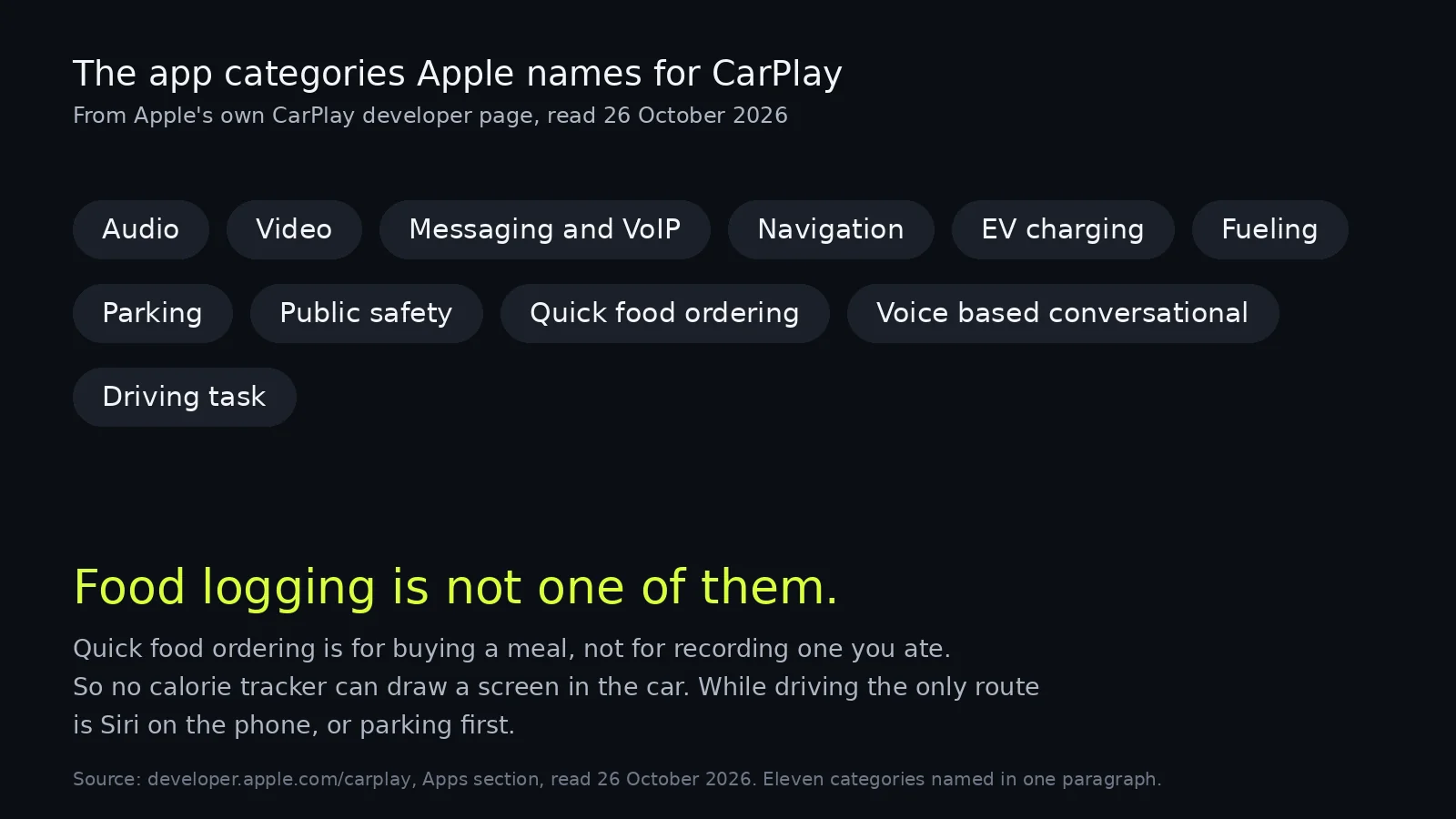
Apple's wording is about tasks you do on the way somewhere: EV charging, fueling, parking, public safety and quick food ordering "can help people accomplish important tasks without taking out their phone" (Apple CarPlay for developers). Ordering a burrito is a category. Recording that you ate one is not.
That leaves Siri on the phone, and it is worth being honest about what that costs. AAA had 120 drivers use the built-in systems of 30 model year 2017 cars, and rated 23 of the 30 at high or very high demand (AAA Foundation, 2017).
The useful detail for us is the direction. Voice lowered visual demand against the other modes, but the interactions ran longer, and the longer time cancelled the gain. A one-sentence log is near the short end of that range; anything that makes you read a list of matches is not, and should wait until you park.
What works when my hands are covered in oil?
A spoken Siri phrase, and after that the accessibility settings. Cooking is the easier case because you can look at the screen, you just cannot touch it.
Four things to set up once, in this order:
- Settings, then Apple Intelligence & Siri, then Talk to Siri, so the phrase works without the side button. Cronometer's article walks through the same screens.
- Settings, Accessibility, Siri. Cronometer's page points here for pause time and for the Always Listen option, which it says lets Siri listen while the phone is locked.
- AirPods, if the phone is across the kitchen. The phrase is the same and the microphone is nearer your mouth.
- For an app with no Siri phrase at all, Voice Control. Apple's page describes speaking commands "just like you would perform an action by touch", and the Show names command puts labels on everything tappable (Apple Support).
Voice Control is the slow option because you say the name of every button, and it is the only one that works on apps that shipped no voice support. It was built for people who cannot use a touchscreen, which is also the situation you are in with flour on both hands.
Where MealSaid is the wrong answer
It is a talking app with nothing behind it to browse. My own gaps, in the same spirit as the table.
- No CarPlay app, for the reason above, and no Android.
- No barcode scanner, no photo logging, no food database to search and no restaurant menus.
- iOS 26 and English only, and the phrase needs a connection, because the understanding happens on our server rather than on the phone.
Cronometer is the better choice if you want a verified database and a confirmation step before anything lands in your diary. Its own note recommends reviewing Siri-logged foods the next time you open the app, which is a fair warning that every app in this category should print.
How I checked this
Checked 26 October 2026. I read each company's own help article and counted the touches in its numbered steps, treating "open the app" as one touch and ignoring permission prompts and anything a saved meal would let you skip. The Cronometer, MyFitnessPal and Lose It articles are dated inside their help centres and I have quoted those dates above. The MacrosFirst and MacroFactor pages carry no visible date.
Two things I could not verify. Lose It's App Store description no longer mentions Say It at all, so I am not repeating the Premium label I used for it in an earlier post, and its logging article does not say which tier Say It belongs to. Neither Cronometer nor MacrosFirst states whether its Siri action runs on a locked phone, so those cells say "not stated" rather than "no".
I did not install the competitors for this post, and I did not time anything on a real phone; these are document counts. Corrections to ohmbrock42@gmail.com.
Questions
Can I log calories without touching my phone?
Yes, with a Siri phrase in Cronometer (Gold), MacrosFirst (Premium) or MealSaid (free). Each one takes the meal from your sentence and saves it without opening the app.
Is there a calorie tracker for CarPlay?
No. Apple's CarPlay developer page names eleven app categories and none of them covers food logging or nutrition, so the only in-car route is Siri on the phone.
Does MyFitnessPal voice logging work hands-free?
Not fully. MyFitnessPal's own article has you open the app, tap the plus, tap Voice Log, speak, tap the arrow and tap Log, so two taps come after you finish talking.
Can Siri log food while my iPhone is locked?
It depends on the app, because Apple lets a developer mark an action as runnable while the device is locked. MealSaid's phrase works on a locked phone, and the other apps do not document what they chose.
What if my hands are wet or covered in oil?
Use a Siri phrase, or turn on Voice Control in Accessibility, which drives any app by spoken command. Voice Control is slower because you name each button out loud.