 MealSaid
Does MacroFactor write nutrition to Apple Health?
Yes, and so do Lose It and Cronometer. None of the three names which of Apple Health's 39 nutrition fields it writes. Checked 28 October 2026.
On this page
Yes. MacroFactor writes nutrition to Apple Health, and so do Lose It and Cronometer. What none of the three will tell you in plain text is which nutrition fields they write.
Apple Health accepts 39 nutrition fields (Apple developer documentation). I read each company's own documentation on 28 October 2026 and counted how many of those 39 the text actually names: MacroFactor 0, Cronometer 0, Lose It 1.
I build a calorie tracker, so I had to go and find this out for my own app. Here is each one, with the page it comes from and the date that page was last edited.
Does MacroFactor write nutrition to Apple Health?
Yes, and reads it back. MacroFactor's integrations page carries a five-row table, and the Apple Health column says Yes for Read Nutrition, Write Nutrition, Read Weight, Write Weight and Read Steps.
The catch is that the table is a PNG. Nothing in the page text says MacroFactor writes nutrition anywhere, so a search engine or a chatbot reading that page comes away with no answer (MacroFactor help, Integrations, read 28 October 2026).
The oldest primary statement I found is a March 2022 product update on MacroFactor's own site: "You can now export your nutrition data to Apple Health and Google Fit" (MacroFactor, March 2022).
Reading came later. The version 2.9.3 notes, dated 26 August 2024, added import of the day's calories, macros and micronutrients from Apple Health (release notes). MacroFactor ranks sources, with manual entries first, then its own food log, then Apple Health, so an imported total will not overwrite a day you logged yourself (Integrations).
That ranking rule is the best-documented conflict policy of any tracker I have read, and MacroFactor deserves the credit for it.
Does Lose It write nutrition to Apple Health?
Yes, and its help page is the only one of the three that lists what it sends in plain text. Weight, Food and Exercise go to Apple Health for everyone.
Premium users who have set a corresponding custom goal also send nutrient goals, blood pressure, blood glucose, BMI and body fat (Lose It help, Using Apple Health With Lose It!, last updated 1 April 2026).
Coming back the other way, Lose It reads food only if you grant it Dietary Energy, and it marks those entries: "Foods written from Apple Health to Lose It! will have a heart icon" (same page). That is the single Apple Health field name any of the three documents use.
One limit worth knowing before you switch apps. Lose It cannot backdate the connection, so historical data in Health will not flow in.
Does Cronometer write nutrition to Apple Health?
Yes, but its Apple Health page no longer says what. The page was rewritten on 27 October 2026, and what it covers now is importing activity, heart rate, sleep and backfilled days into Cronometer.
On writing, the live version says only that you can "manually select what data Cronometer can read and write into Apple Health" (Cronometer support, Apple Health and Apple Watch, last updated 27 October 2026).
I quoted an earlier version of that same page on 20 October 2026 in our Apple Health comparison, where it gave a count of 13 nutrients plus cholesterol. That sentence is gone from the version live today, and I cannot verify the number any more, so I am not repeating it.
Cronometer's Android page is a different story. Its Health Connect article lists 12 biometrics plus Food and Water as exports, item by item (Cronometer support, Health Connect, last updated 30 September 2026).
What does nutrition mean in Apple Health?
It means up to 39 separate fields, and an app picks its own subset. Apple groups them as 10 macronutrient fields, 13 vitamins, 8 minerals, 6 ultratrace minerals, water and caffeine.
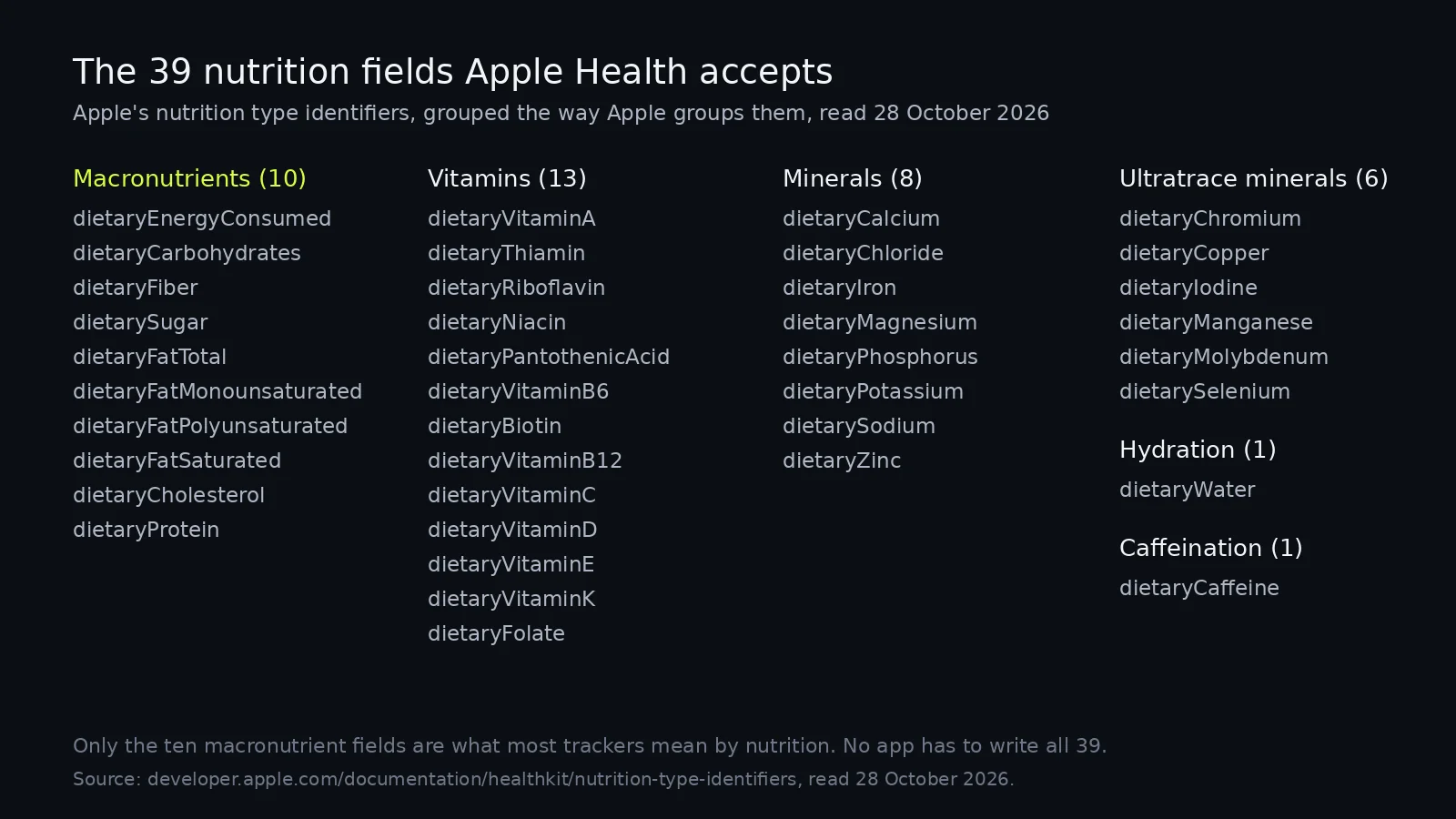
Every one of those is a separate permission. An app that asks for dietaryEnergyConsumed and nothing else is honestly described as writing nutrition to Apple Health, and will still leave your protein history empty (Apple developer documentation, read 28 October 2026).
Which fields does each app actually name?
Between them, one. Lose It names Dietary Energy, and only in the context of reading food in.
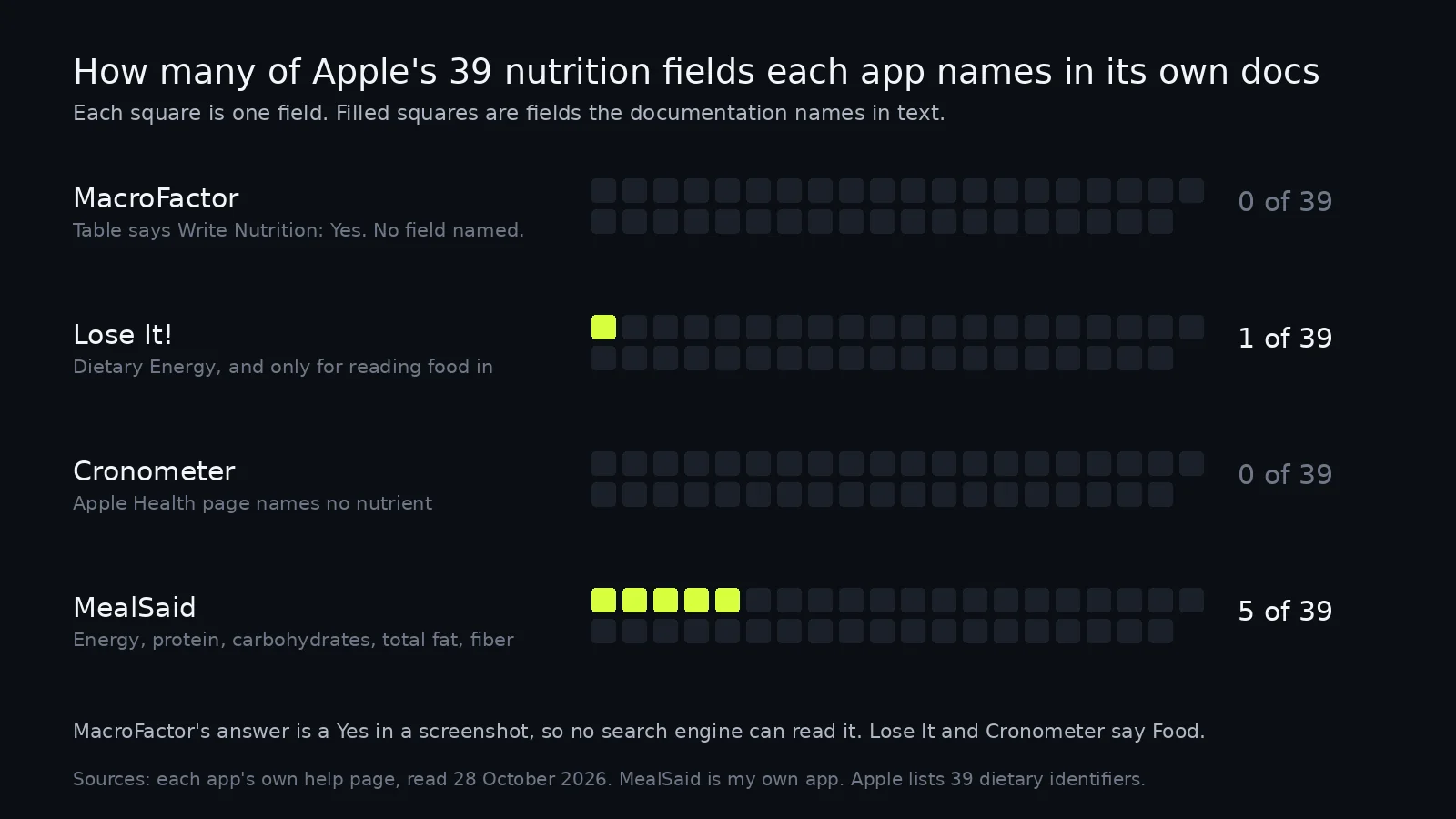
| App | Writes nutrition | Reads nutrition | Fields named in the doc | Source, last updated |
|---|---|---|---|---|
| MacroFactor | Yes, per its integrations table | Yes, day totals | None, the table is an image | MacroFactor help, undated |
| Lose It! | Yes, listed as Food | Yes, with Dietary Energy permission | Dietary Energy | Lose It help, 1 Apr 2026 |
| Cronometer | Yes, no detail given | No food import listed | None | Cronometer support, 27 Oct 2026 |
| MealSaid | Yes | No | Energy, protein, carbohydrates, total fat, fiber | How MealSaid works |
Two of those rows are worse than they look. MacroFactor's answer exists but is unreadable to anything that cannot see a picture, and Cronometer's answer existed eight days ago and does not now.
Why does the missing field list matter?
Because the next app you try can only import what the last one wrote. Apple Health is the handover, and the handover is field by field.
Say you spend a year in one tracker, then move. If that tracker only ever wrote dietary energy, your new app sees calories and nothing else, however carefully you logged your macros. There is no way to find this out from a marketing page.
It matters for double counting too. Two apps writing the same meal give you a doubled day in Health, which is the single most common Apple Health complaint I see, and the fix is picking one source per field.
MealSaid, my app, writes five fields: dietary energy, protein, carbohydrates, total fat and fiber, plus workouts. It writes nothing else, so no vitamins and no sodium, and it does not read food from Health at all. It is iPhone only, needs iOS 26, is English only, and has no barcode scanner. If you want vitamins and minerals in Health, use Cronometer: its own page lists 84 nutrients in the free Basic column (Cronometer Gold, read 28 October 2026).
How I checked this
Checked 28 October 2026. I counted Apple's nutrition type identifiers from Apple's own documentation page and got 39 dietary fields across six groups. I read the MacroFactor, Lose It and Cronometer help pages the same day, and for the two Zendesk help centres I pulled each article through the public help centre API so I could record the exact last-updated timestamp rather than trusting a byline.
MacroFactor's integrations table is an image, which I downloaded and read directly; it has five rows and the Apple Health column reads Yes in all five. MacroFactor's help pages carry no last-updated date at all.
What I could not verify: the number of nutrients Cronometer exports to Apple Health, which its page no longer states, and whether MacroFactor writes individual micronutrient fields or only calories and macros. Both companies could settle this with one list.
Corrections to ohmbrock42@gmail.com.
Questions
Does MacroFactor write nutrition to Apple Health?
Yes. The integrations page in MacroFactor's help centre has a table with a Write Nutrition row and a Yes under Apple Health. The table is an image, so the answer does not appear in the page text.
Does MacroFactor read nutrition from Apple Health?
Yes, since version 2.9.3 in August 2024. MacroFactor ranks its own food log above Apple Health, so a day you logged in MacroFactor will not be overwritten by an imported total.
Does Lose It write food to Apple Health?
Yes. Its help page lists Weight, Food and Exercise as what Lose It sends to Apple Health, with nutrient goals, blood pressure, blood glucose, BMI and body fat added for Premium users with a custom goal.
Which nutrients does Cronometer send to Apple Health?
Its Apple Health page does not say. The version live on 28 October 2026 only states that you choose what Cronometer can read and write, with no field list.
Why does it matter which fields an app writes?
Because another app reading Apple Health only sees the fields that were written. If only calories were written, your protein history is not there to import.